
YouTube thumbnails
YouTube thumbnail maker
A thumbnail is the first thing viewers judge your video by. ZeoCanvas opens at 1280×720 pixels, the size YouTube recommends, with templates built around big readable titles and strong focal points.
Cut yourself out of a photo with on-device background removal, place the cut-out over a bold background and add a headline — all in one editor.
Free · No signup required
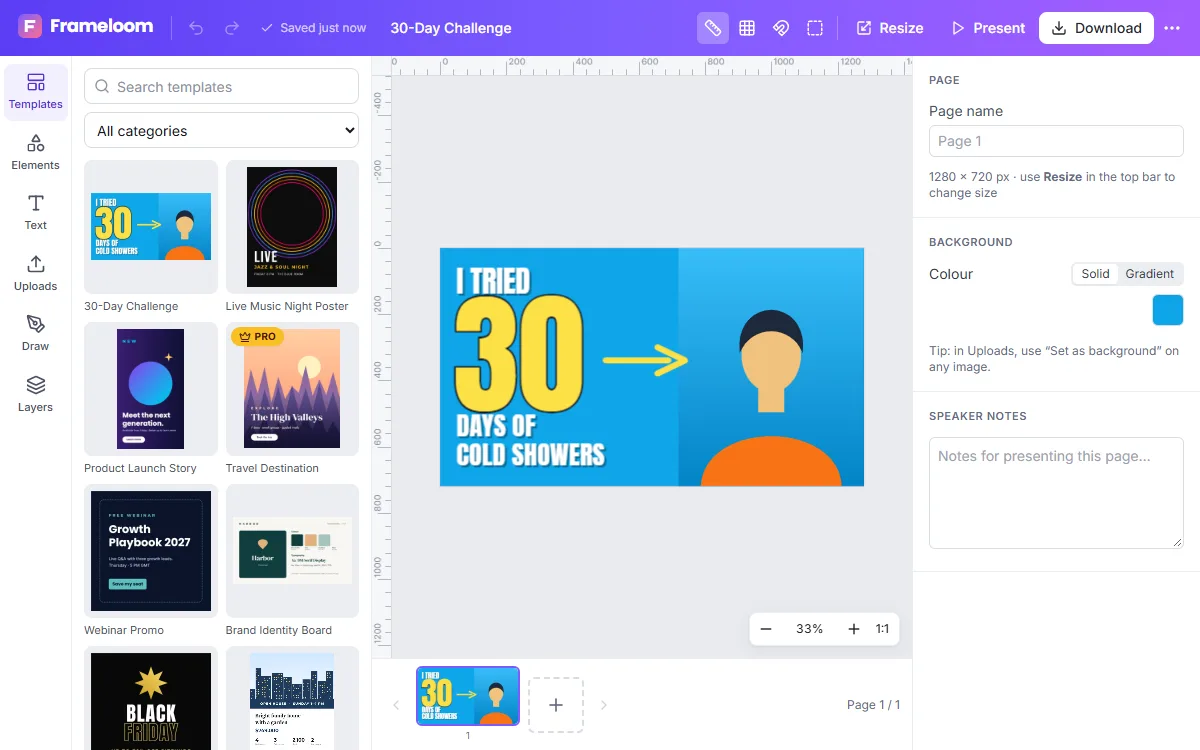
Features of the YouTube Thumbnail Maker
1280×720 preset
The 16:9 size YouTube recommends for custom thumbnails, ready from the first click.
Background removal
Separate a face or product from its background and add a colour or image behind it.
Outlined text
Thick outlines and drop shadows make titles readable on any background, even at small sizes.
Small file sizes
Export JPG with an adjustable quality slider to stay under YouTube’s 2 MB upload limit.
How to use the YouTube Thumbnail Maker
- 1
Start from a template
Choose a thumbnail layout or the blank 1280×720 preset.
- 2
Add your photo and title
Upload a frame from your video, remove its background, then write a short title.
- 3
Export a JPG
Download a JPG and upload it as the custom thumbnail in YouTube Studio.
What makes a thumbnail clickable
Thumbnails are often seen at less than 200 pixels wide. Use three to five words at most, a face or object that reads clearly at small size and strong contrast between foreground and background.
- Check legibility by zooming the editor out
- Keep the bottom-right corner clear — YouTube shows the video length there
- Use a consistent style across a series
Design thumbnails as a series
Channels that grow often use a recognisable thumbnail style: the same font, a consistent colour accent and similar framing. Save your best thumbnail as a private template, then start each new video’s thumbnail from it and change only the photo and title.
Frequently asked questions
What size should a YouTube thumbnail be?
1280×720 pixels (16:9) with a minimum width of 640 pixels. ZeoCanvas’s preset uses 1280×720.
How do I keep the file under 2 MB?
Export as JPG and lower the quality slider slightly; the dialog shows the format options before you download.
Is the background remover free?
Yes. It runs on your device, so there are no credits or per-image fees.
Related tools
Photo Background Remover
Remove photo backgrounds automatically with AI that runs on your own device. Get a transparent PNG or replace the background with a colour or image.
Image Enhancer
Upscale small or soft images 2× to 4× with an AI super-resolution model, then fine-tune sharpness, noise and colour. Runs privately in your browser.
Social Media Design Maker
Create matching designs for Instagram, Facebook, LinkedIn and YouTube. Resize one design to every platform with Magic Resize and keep your look consistent.
Instagram Post Maker
Make scroll-stopping Instagram posts with free square and portrait templates. Edit text, colours and photos, then download a crisp PNG or JPG.
Try the YouTube Thumbnail Maker now
It is free, it runs in your browser and you do not need an account to start.