
Photo editor
A complete photo editor that runs in your browser
Upload a photo and edit it right in your browser: crop and straighten, fix exposure and colour, apply a filter, remove the background or upscale it with AI. Then use it in a design or download it.
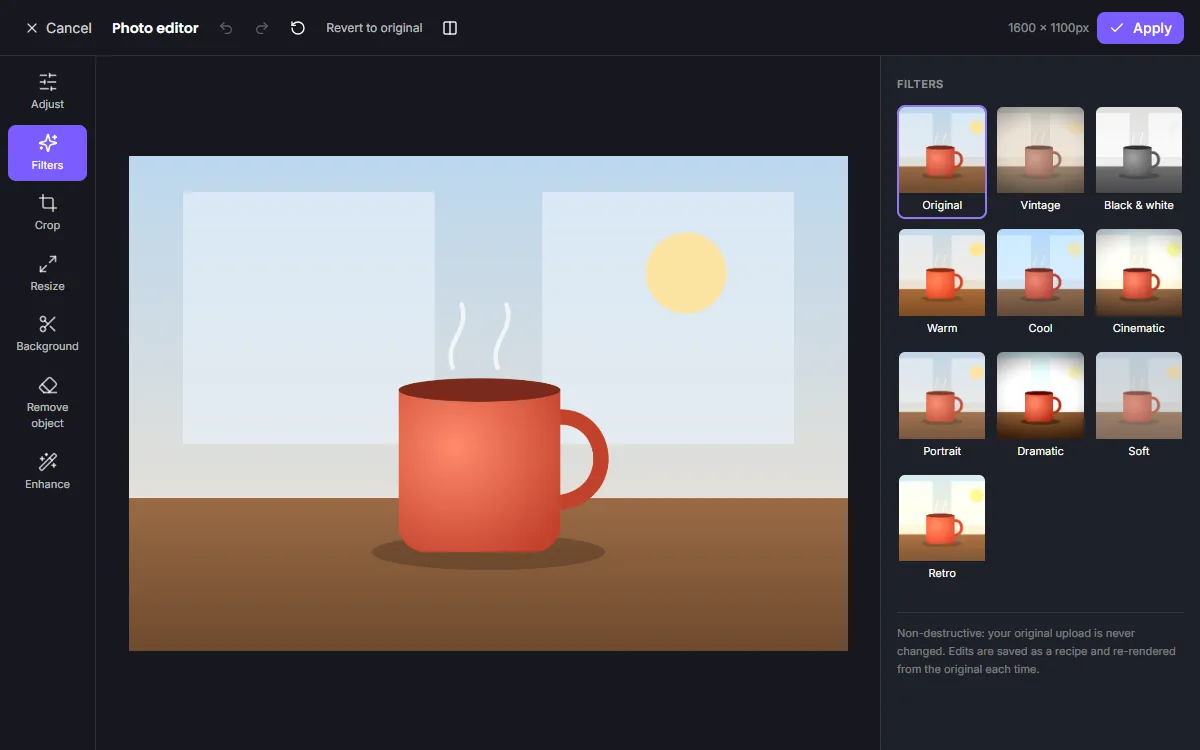
Every tool in one editor
Seven tool panels cover the whole editing workflow. Switch between them freely — nothing is applied to your original until you choose Apply.
Adjust
Exposure, brightness, contrast, highlights, shadows, saturation, temperature, tint, sharpness, blur and vignette.
Filters
Vintage, B&W, warm, cool, cinematic, portrait, dramatic, soft and retro, each with an intensity slider.
Crop
Free or fixed aspect ratios, 90° rotation, flips and a straighten slider.
Resize
Exact pixel dimensions or social presets, with or without locked proportions.
Background
AI background removal with transparent, colour or image backgrounds.
Remove object
Brush over distractions and let AI inpainting fill the gap. Accept or reject the result.
Enhance
AI upscaling 2× or 4×, plus denoise and sharpening.
Non-destructive by design
Your upload is never overwritten. ZeoCanvas stores your edits as a recipe — crop box, slider values, filter and AI results — and renders the final image from the untouched original. Reopen a photo next month and every setting is exactly where you left it.
Built into the design editor
Select any image in a design and choose Edit photo. When you apply, the photo keeps its place, size and rotation on the page, so you can perfect a picture without rebuilding your layout.
Photo editor FAQ
Is the photo editor non-destructive?
Yes. Your original image is never changed. Every adjustment, crop and filter is stored as a recipe and re-rendered from the original.
Can I edit a photo that is already in my design?
Yes. Select the image and choose Edit photo. When you apply, the image keeps its position, size and rotation on the page.
How large can my photos be?
Uploads can be up to 25 MB. The editor previews large photos at screen resolution and renders the full resolution when you apply.
Looking for something specific? See the online photo editor, background remover and image enhancer guides.
Edit your first photo
Upload an image and start editing — no account needed.