
Image editor
Free online image editor
ZeoCanvas gives you a full image editor in a browser tab. Open a picture and crop it, straighten it, fix the light, change the mood with a filter or lift the subject off its background — then drop the result straight into a design or download it.
There is nothing to install and no account to create. Your first edit starts the moment you upload a photo.
Free · No signup required
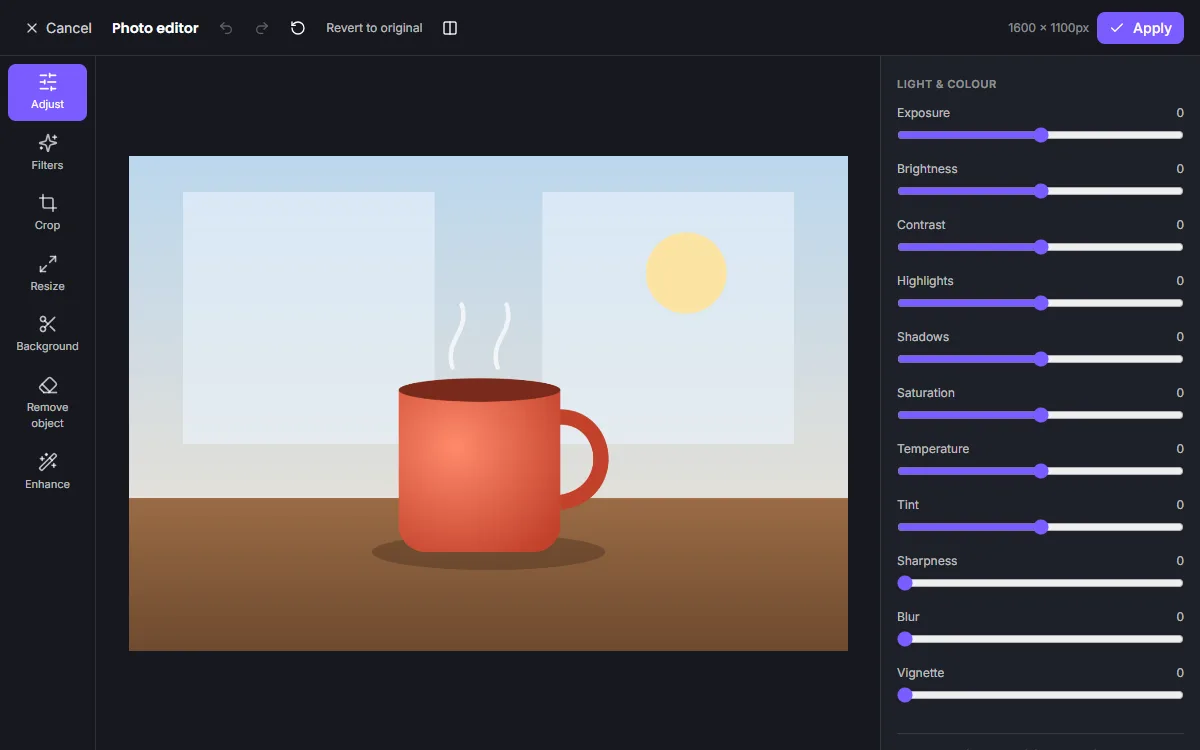
Features of the Free Online Image Editor
Crop, rotate and straighten
Free-form or fixed-ratio crops (1:1, 4:5, 16:9 and more), 90° rotation, horizontal and vertical flip and a fine straighten slider.
11 precise adjustments
Exposure, brightness, contrast, highlights, shadows, saturation, temperature, tint, sharpness, blur and vignette.
10 filters with intensity
Vintage, black & white, warm, cool, cinematic, portrait, dramatic, soft and retro looks, each blended from 0 to 100%.
Resize to exact pixels
Type a width and height or pick a social preset, with the aspect ratio locked or unlocked.
Background removal
An AI model separates the subject from the background on your device and exports a transparent PNG.
Non-destructive history
The original upload is never overwritten. Reopen the editor later and every slider is where you left it.
How to use the Free Online Image Editor
- 1
Upload a photo
Choose a JPG, PNG, WebP or GIF up to 25 MB. It opens in the editor immediately.
- 2
Make your edits
Switch between Adjust, Filters, Crop, Resize, Background, Remove object and Enhance. Toggle a before/after comparison at any time.
- 3
Apply and export
Apply the edit to your design, add text or graphics if you like, and download as PNG, JPG, WebP or PDF.
Why edit images in the browser?
Desktop photo software is powerful but heavy, and many online editors push you to sign up before you can save anything. ZeoCanvas runs the whole pixel pipeline inside your browser using a background worker, so sliders respond instantly and large photos stay smooth.
Because editing happens on your device, the AI tools never send your photo to a third-party AI service. The edited result is stored with your design so you can come back to it.
Edits you can undo at any time
Every change is saved as a recipe — crop box, slider values, filter and strength — instead of being baked into the pixels. Re-rendering always starts from the untouched original, so repeated editing never adds compression artefacts.
- Reset a single tool or everything at once
- Compare before and after in a split view
- Undo and redo inside the photo editor
Frequently asked questions
Is the image editor really free?
Yes. Editing, AI tools and downloads are free, and you can use them as a guest without creating an account.
Which file types can I open?
PNG, JPEG, WebP and GIF images up to 25 MB. Files are checked and decoded on the server before they are accepted.
Will editing reduce the quality of my photo?
No. The original is kept untouched and every edit is re-rendered from it at full resolution when you apply it.
Can I edit on my phone?
Yes. The editor adapts to small screens; AI tools can be slower on phones because they run on the device.
Related tools
Online Photo Editor
Fix exposure, warm up colours and add film-style filters with an online photo editor. Every edit is non-destructive, so you can change it any time.
Photo Background Remover
Remove photo backgrounds automatically with AI that runs on your own device. Get a transparent PNG or replace the background with a colour or image.
Image Enhancer
Upscale small or soft images 2× to 4× with an AI super-resolution model, then fine-tune sharpness, noise and colour. Runs privately in your browser.
Free Graphic Design Tool
Create professional graphics with a free drag-and-drop design tool: templates, text styles, shapes, photos, multi-page designs and PNG, PDF or SVG export.
Try the Free Online Image Editor now
It is free, it runs in your browser and you do not need an account to start.