
Instagram posts
Instagram post maker
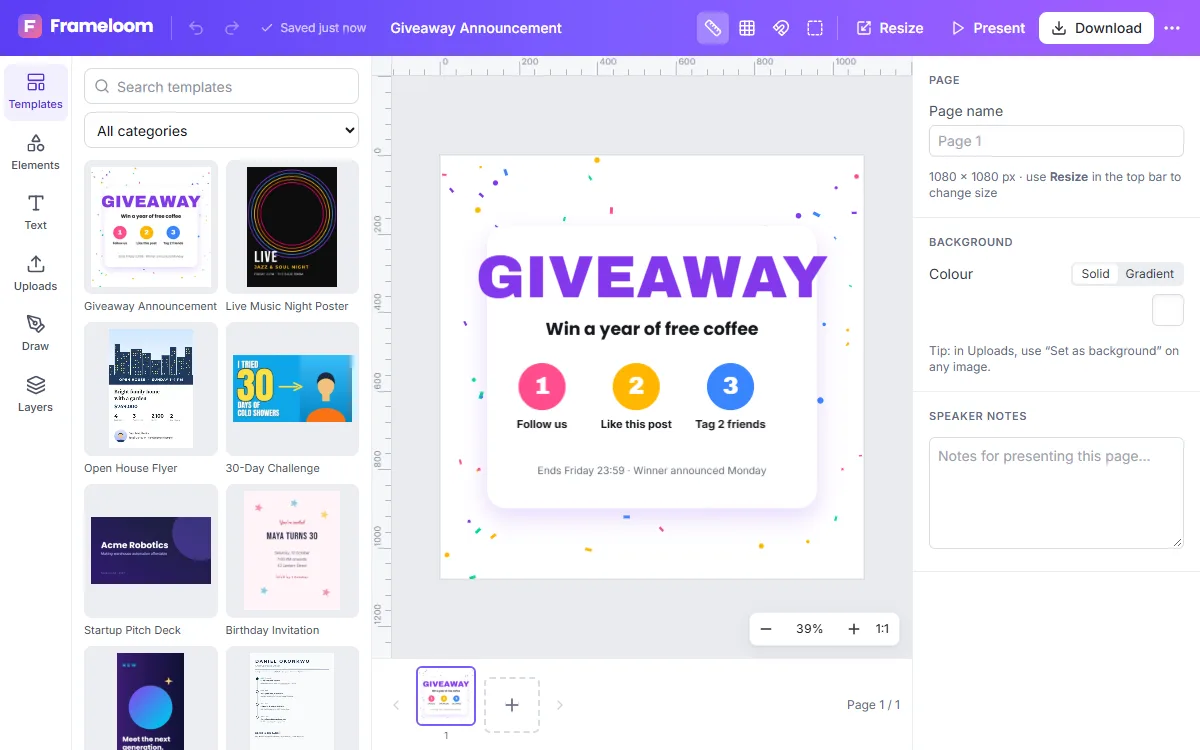
Create Instagram posts that stop the scroll. ZeoCanvas opens at exactly 1080×1080 pixels for square posts or 1080×1350 for portrait posts, the sizes Instagram displays at full quality.
Start with a template designed for announcements, quotes, product launches or promotions, and make it yours in a few minutes.
Free · No signup required
Features of the Instagram Post Maker
Correct sizes built in
Square 1080×1080 and portrait 1080×1350 presets, so posts are never cropped unexpectedly.
Carousel-ready
Add pages to build a multi-slide carousel and export every slide at once as a ZIP of images.
Photo tools included
Brighten a product shot, apply a filter or remove its background without leaving the design.
Matching story
Use Magic Resize to turn your post into a 1080×1920 story with the same content.
How to use the Instagram Post Maker
- 1
Choose a template
Browse Instagram post templates or start from a blank square canvas.
- 2
Add your content
Replace the headline, swap in your photo and match colours to your brand.
- 3
Download and post
Export as PNG for graphics with text, or JPG for photo-heavy posts, then upload to Instagram.
Tips for posts that perform
Keep one clear message per post and make the headline readable at thumbnail size. High contrast between text and background matters more on a phone screen than on a desktop monitor.
- Use at most two typefaces
- Leave breathing room around the edges
- Repeat brand colours across posts so your grid looks consistent
Square or portrait?
Portrait posts (4:5) take up more of the feed on a phone, so they are a good choice for photos and announcements. Square posts are simpler to design and display fully in the profile grid.
Post ideas to get started
Not sure what to post? Announce a new product with a cut-out photo on a bold background, share a customer quote, post a tip in large type or create a carousel that teaches something in five slides. Templates cover these formats, so you only need to add your content.
Frequently asked questions
What size is an Instagram post?
Use 1080×1080 pixels for square posts and 1080×1350 pixels for portrait posts. Both presets are built into ZeoCanvas.
Can I make a carousel?
Yes. Add pages to your design and export them together — each page becomes one slide.
Which format should I download?
PNG keeps text and graphics sharpest. JPG produces smaller files for photo-heavy posts.
Related tools
Instagram Story Maker
Design Instagram Stories at the right 9:16 size with free templates, bold text and photo tools. Keep key content in the safe zone and export in seconds.
Social Media Design Maker
Create matching designs for Instagram, Facebook, LinkedIn and YouTube. Resize one design to every platform with Magic Resize and keep your look consistent.
Photo Background Remover
Remove photo backgrounds automatically with AI that runs on your own device. Get a transparent PNG or replace the background with a colour or image.
Online Photo Editor
Fix exposure, warm up colours and add film-style filters with an online photo editor. Every edit is non-destructive, so you can change it any time.
Try the Instagram Post Maker now
It is free, it runs in your browser and you do not need an account to start.