
Instagram stories
Instagram story maker
Design vertical Instagram Stories at 1080×1920 pixels — the full-screen 9:16 format used by Stories and Reels covers.
Story templates in ZeoCanvas keep headlines and buttons away from the top and bottom edges, where Instagram places the profile name and reply bar.
Free · No signup required
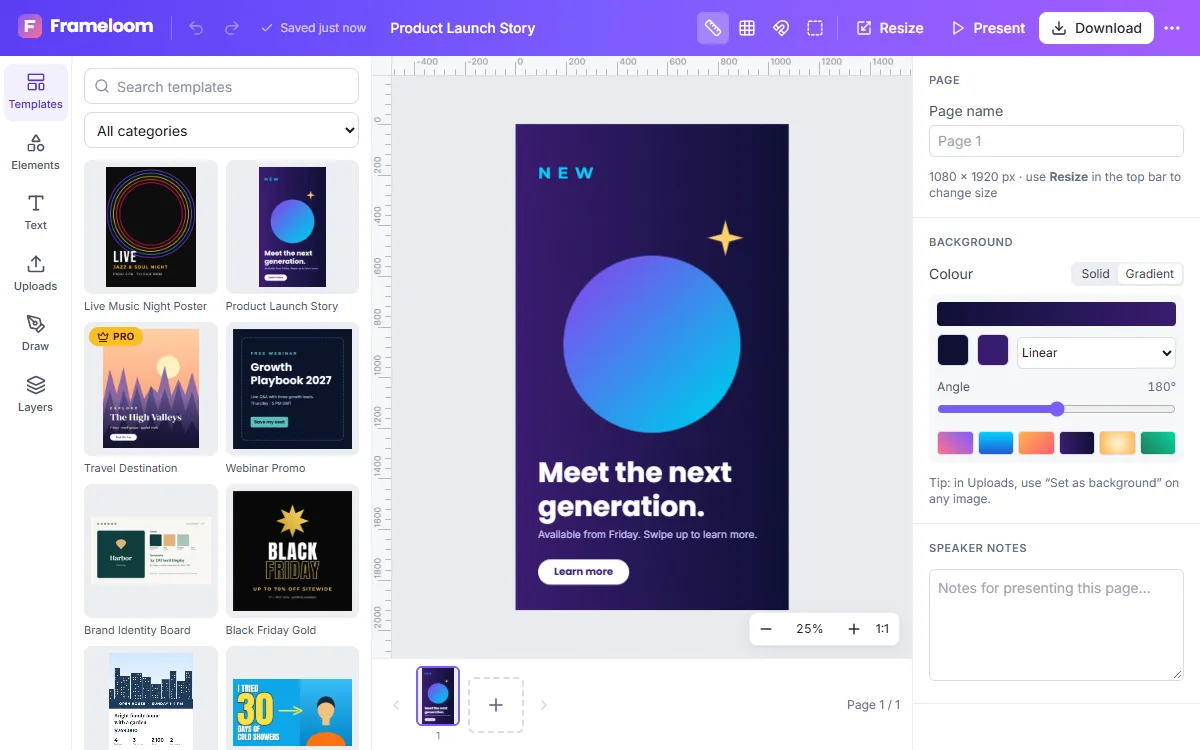
Features of the Instagram Story Maker
Full-screen 9:16 canvas
The Instagram Story preset opens at 1080×1920 so nothing is cropped or blurred.
Multi-story sequences
Design several frames as pages of one design and download them together.
Bold type styles
Large display fonts, outlines and shadows keep text readable over photos.
Cut-out subjects
Remove a photo background to place yourself or a product over a coloured backdrop.
How to use the Instagram Story Maker
- 1
Open a story template
Pick a story layout or start from the 1080×1920 preset.
- 2
Personalise it
Edit text, swap photos and adjust colours. Rulers and guides help you respect the safe zone.
- 3
Export to your phone
Download PNG or JPG files and post them from the Instagram app.
Design for the safe zone
Instagram overlays your profile picture at the top and the reply field at the bottom of every story. Keep important text roughly 250 pixels away from the top and bottom edges so it is never hidden.
Reuse your best content
Already designed a post? Magic Resize turns it into a story layout automatically, so you can promote the same announcement in the feed and in Stories without starting over.
Ideas for stories
Stories work best for timely, lightweight updates: a countdown to a launch, behind-the-scenes photos, a quick tip, a poll prompt or a reminder that a sale ends today. Because each frame is only on screen for a few seconds, keep text short and put the most important words in the largest type.
- Announcements and countdowns
- Product highlights with a cut-out photo
- Quotes and tips in bold type
- Event reminders with the date front and centre
Frequently asked questions
What is the Instagram Story size?
1080×1920 pixels, a 9:16 aspect ratio. ZeoCanvas has a preset for it.
Can I add stickers and shapes?
Yes. Vector stickers, arrows, shapes and lines can be added and recoloured to match your story.
Can I animate my story?
ZeoCanvas exports still images. You can add the finished images to Instagram and use its own music and sticker features.
Related tools
Instagram Post Maker
Make scroll-stopping Instagram posts with free square and portrait templates. Edit text, colours and photos, then download a crisp PNG or JPG.
Social Media Design Maker
Create matching designs for Instagram, Facebook, LinkedIn and YouTube. Resize one design to every platform with Magic Resize and keep your look consistent.
YouTube Thumbnail Maker
Create click-worthy YouTube thumbnails at 1280×720. Cut out your face with background removal, add bold titles and export a JPG under 2 MB.
Photo Background Remover
Remove photo backgrounds automatically with AI that runs on your own device. Get a transparent PNG or replace the background with a colour or image.
Try the Instagram Story Maker now
It is free, it runs in your browser and you do not need an account to start.