
Business cards
Business card maker
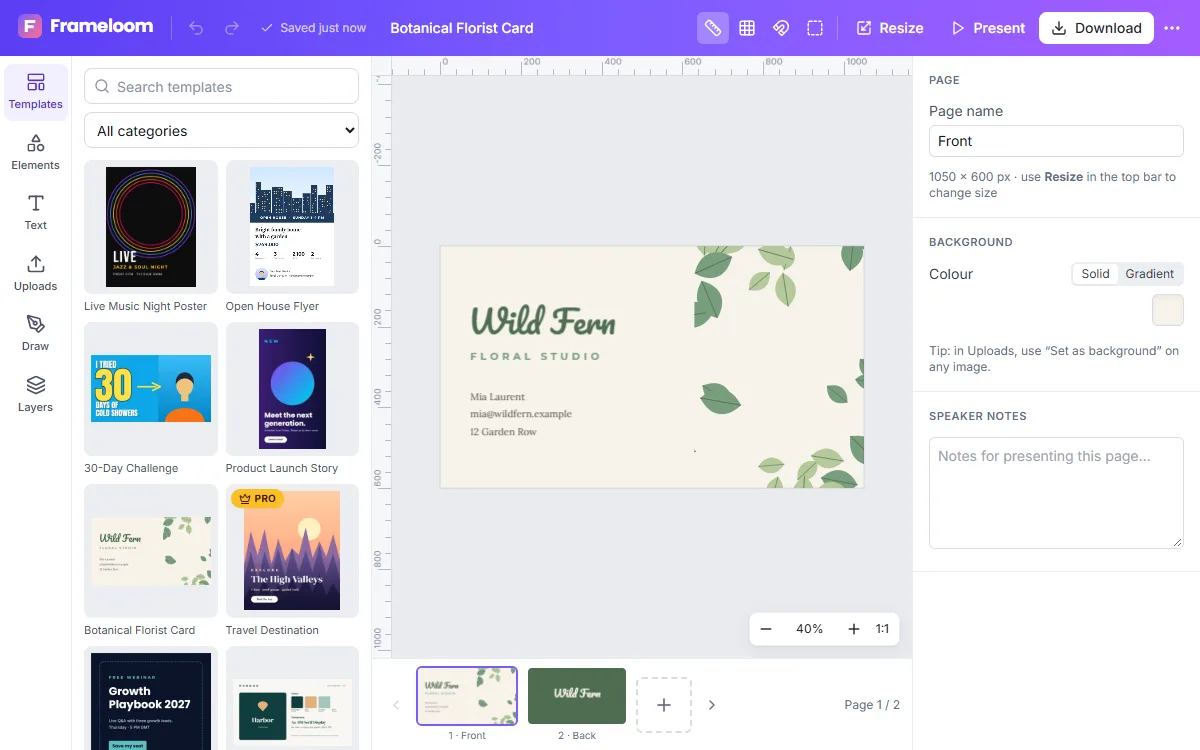
Design a business card that represents you well. ZeoCanvas’s business card templates include a front and back, with room for your name, role, contact details and logo.
The card preset uses the standard 3.5×2 inch proportion, and the print PDF option renders at 300 DPI.
Free · No signup required
Features of the Business Card Maker
Front and back
Two-page templates so both sides of the card are designed together.
Logo friendly
Upload a PNG logo with transparency or remove the background from a logo photo.
Precise alignment
Align and distribute text blocks exactly, and lock elements you do not want to move.
Print-ready export
Download a 300 DPI PDF with both sides as separate pages.
How to use the Business Card Maker
- 1
Pick a card template
Choose a minimal, bold or classic layout.
- 2
Add your details
Enter your name, title, phone, email and website, then add your logo.
- 3
Download for print
Export the PDF and send it to a print service.
Keep it readable
Business cards are small. Keep body text at a comfortable size, limit yourself to the details people actually need and leave space around them. Use the back for a logo, a pattern or a short tagline.
Front and back ideas
Many people put contact details on the front and a logo or a bold brand colour on the back. Another popular layout puts the name and role on the front with plenty of space, and the phone, email and website on the back. Whichever you choose, keep the same typefaces and colours on both sides so the card feels like one piece.
- Name and role in the largest type
- One accent colour from your brand
- A website or handle people can remember
Frequently asked questions
What size is a business card?
The preset uses the standard 3.5×2 inch (7:4) proportion at 1050×600 pixels.
Can I add a QR code?
ZeoCanvas does not generate QR codes. You can upload a QR code image created elsewhere and place it on your card.
Will the colours match when printed?
Exports are in RGB. Colours may shift slightly in print; ask your printer for a proof if exact colour matters.
Related tools
Flyer Maker
Make flyers for events, promotions and services with editable A4 templates. Swap photos, update details and export a print-ready PDF or shareable image.
Resume Design Maker
Make a polished, readable resume with free Letter-size templates. Edit sections, fonts and colours, then download a PDF that is ready to send.
Free Graphic Design Tool
Create professional graphics with a free drag-and-drop design tool: templates, text styles, shapes, photos, multi-page designs and PNG, PDF or SVG export.
Photo Background Remover
Remove photo backgrounds automatically with AI that runs on your own device. Get a transparent PNG or replace the background with a colour or image.
Try the Business Card Maker now
It is free, it runs in your browser and you do not need an account to start.