
Invitations
Invitation maker
Design invitations for weddings, birthdays, baby showers, dinners and parties. ZeoCanvas invitation templates use the classic 5×7 inch format and elegant typography that you can personalise in minutes.
Print them at home, order prints from a shop or send them as images through messaging apps.
Free · No signup required
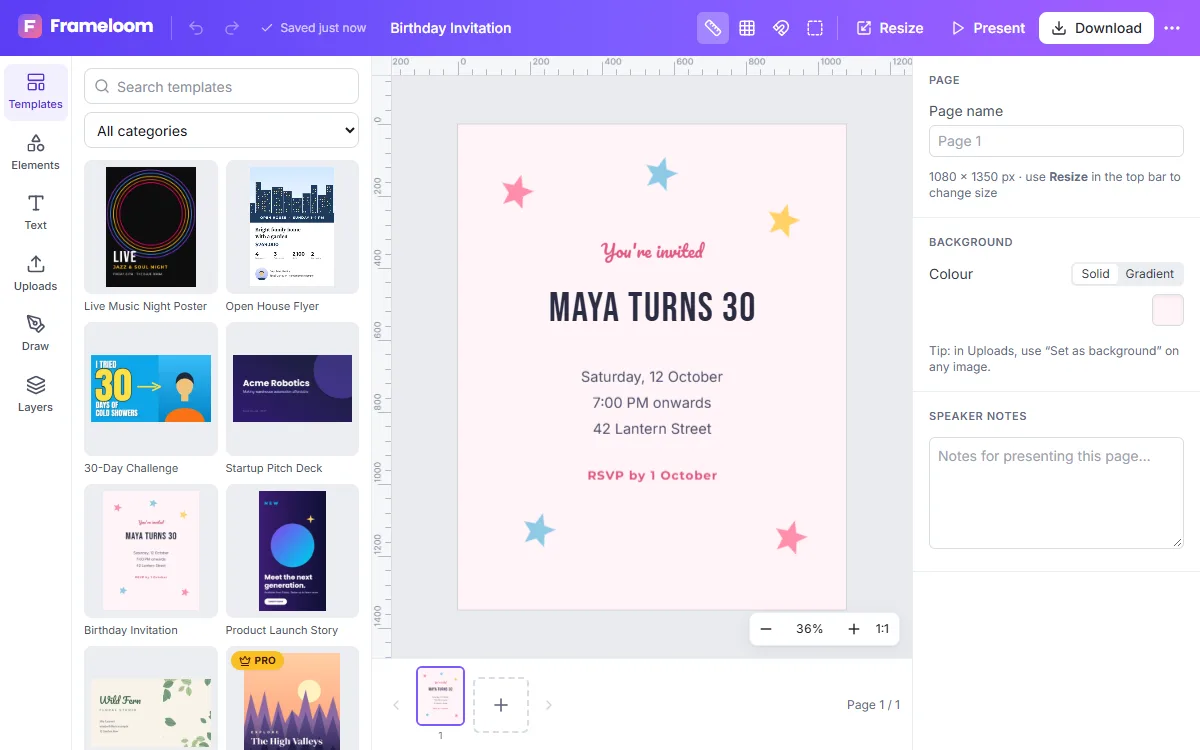
Features of the Invitation Maker
5×7 inch format
The most common invitation size, at a resolution suited to printing.
Elegant type
Serif and script fonts such as Cormorant Garamond, Playfair Display and Pacifico.
Your own photos
Add a photo, soften it with a filter and frame it with shapes.
Print or share
Download a print PDF or a JPG that is easy to send digitally.
How to use the Invitation Maker
- 1
Pick an occasion
Choose an invitation template that fits the event.
- 2
Add the details
Names, date, time, place and how to RSVP.
- 3
Print or send
Export a PDF for printing or an image for messaging.
What to include
Guests need the host, the occasion, the date and time, the address and how to reply. Put the occasion or names at the top, keep logistics together and leave enough space between lines for a calm, elegant look.
Print or share digitally
For printed invitations, export the PDF with the print-quality option and choose a heavier card stock at the print shop. For digital invitations, export a JPG — it is small enough to send in a message — or a PNG if your design has fine lines and small text. You can create both versions from the same design.
Frequently asked questions
What size are invitations?
The preset is 5×7 inches. You can also create square or custom-sized invitations.
Can I make matching cards?
Yes. Duplicate your design and adapt it for save-the-dates, menus or thank-you cards.
Can I send invitations from ZeoCanvas?
ZeoCanvas does not send messages. Download the image and send it through your preferred app or email.
Related tools
Poster Maker
Design event, sale and announcement posters with free templates in 18×24 in and A3 sizes. Download a print-quality 300 DPI PDF or a PNG.
Flyer Maker
Make flyers for events, promotions and services with editable A4 templates. Swap photos, update details and export a print-ready PDF or shareable image.
Online Photo Editor
Fix exposure, warm up colours and add film-style filters with an online photo editor. Every edit is non-destructive, so you can change it any time.
Free Graphic Design Tool
Create professional graphics with a free drag-and-drop design tool: templates, text styles, shapes, photos, multi-page designs and PNG, PDF or SVG export.
Try the Invitation Maker now
It is free, it runs in your browser and you do not need an account to start.