
Flyers
Flyer maker
Promote an event, a sale or a local service with a flyer you designed yourself. ZeoCanvas’s A4 flyer templates are ready to print at home or at a copy shop, and look just as good shared as an image.
Swap in your photos, update the details and download in minutes.
Free · No signup required
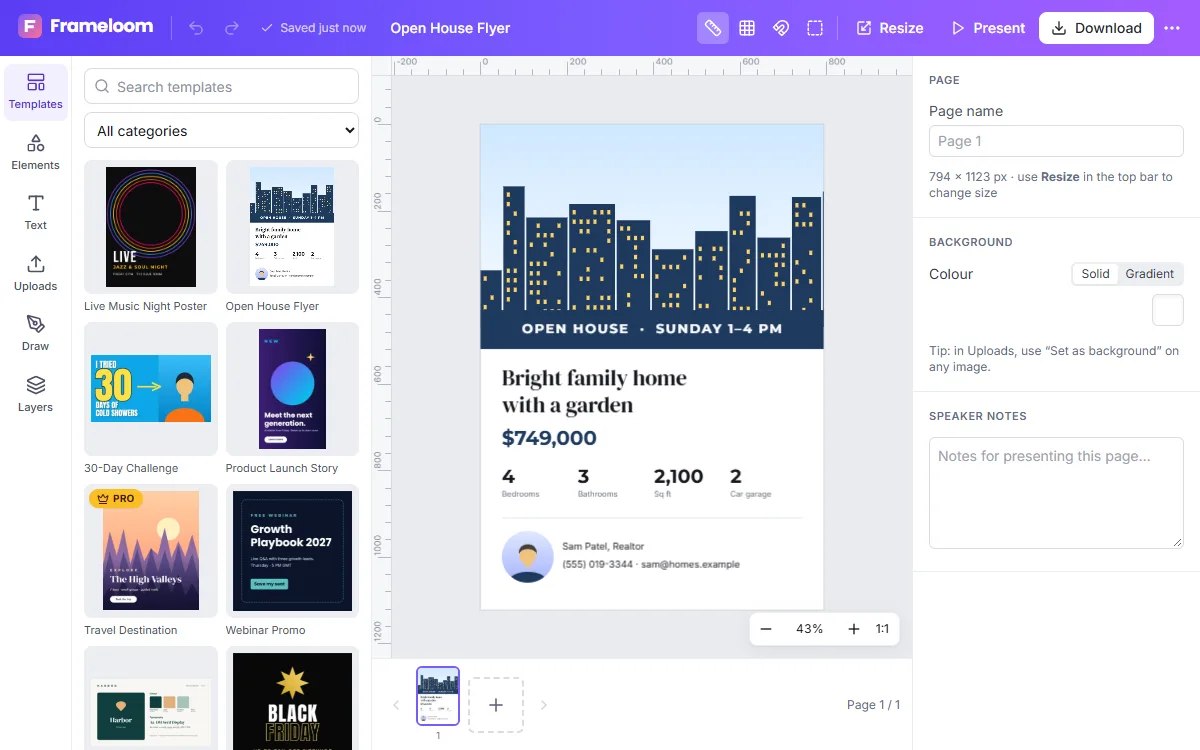
Features of the Flyer Maker
A4 templates
Layouts for promotions, events, services and real estate, sized for A4 paper.
Double-sided flyers
Add a second page for the back and export both together as a PDF.
Brand colours
Recolour shapes, text and backgrounds with the colour picker.
Share digitally
Export PNG or JPG for email, messaging apps and social media.
How to use the Flyer Maker
- 1
Choose a flyer layout
Pick a template or start with the A4 preset.
- 2
Edit text and photos
Write a clear headline, add the essential details and replace placeholder images.
- 3
Print or send
Download a print-quality PDF or an image file to share.
What to put on a flyer
A good flyer answers three questions at a glance: what is it, when or where is it, and what should the reader do next. Put the offer or event in the headline and end with a phone number, address or website.
- One headline, one supporting line
- A single strong photo instead of many small ones
- Contact details large enough to read from a distance
Printing your flyer
For home printing, export the PDF with the print-quality option and print at 100% scale so the layout is not shrunk. For a copy shop, ask whether they need a margin or bleed; if they do, extend background colours to the page edges and keep text comfortably inside. Heavier paper makes colours look richer and flyers feel more substantial.
Frequently asked questions
What size is a flyer?
ZeoCanvas’s flyer preset is A4 (210×297 mm). You can also create US Letter or any custom size.
Can I print at home?
Yes. Download the PDF and print at 100% scale on A4 paper.
Can I reuse a flyer for social media?
Yes. Use Magic Resize to create an Instagram post or Facebook version of the same flyer.
Related tools
Poster Maker
Design event, sale and announcement posters with free templates in 18×24 in and A3 sizes. Download a print-quality 300 DPI PDF or a PNG.
Business Card Maker
Design front and back business cards with free templates. Add your logo, contact details and brand colours, then download a 300 DPI PDF for printing.
Social Media Design Maker
Create matching designs for Instagram, Facebook, LinkedIn and YouTube. Resize one design to every platform with Magic Resize and keep your look consistent.
Free Graphic Design Tool
Create professional graphics with a free drag-and-drop design tool: templates, text styles, shapes, photos, multi-page designs and PNG, PDF or SVG export.
Try the Flyer Maker now
It is free, it runs in your browser and you do not need an account to start.