
Photo editor
Online photo editor
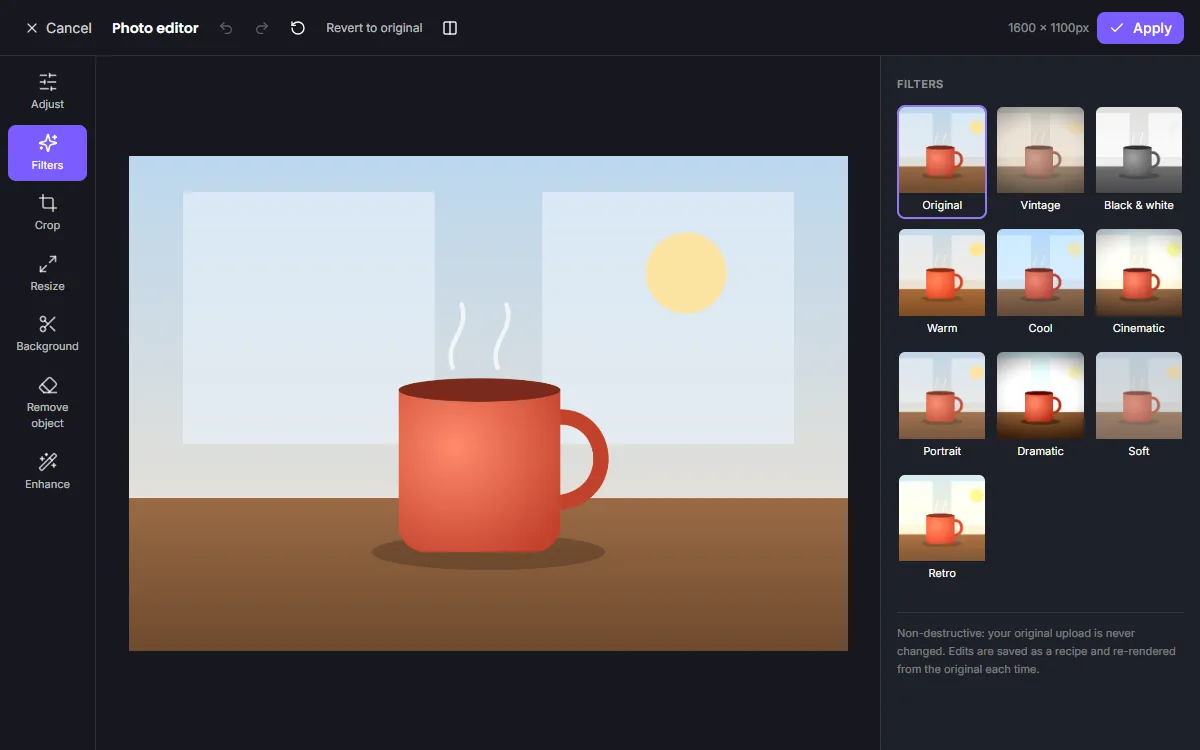
Edit photos online without downloading anything. Fix exposure, recover shadows, warm up a cold scene or apply one of ten film-style filters — with live previews as you drag each slider.
Every edit is stored as a recipe, so you can reopen the photo next week and adjust it again from the original.
Free · No signup required
Features of the Online Photo Editor
Light
Exposure, brightness, contrast, highlights and shadows to balance difficult lighting.
Colour
Saturation, temperature and tint to correct white balance or set a mood.
Detail and effects
Sharpness, blur and vignette for focus and finish.
Filters
Ten looks from vintage to cinematic, each with an intensity slider.
How to use the Online Photo Editor
- 1
Upload a photo
Choose an image from your device; it opens in the photo editor.
- 2
Adjust and filter
Drag sliders or pick a filter. Toggle the before/after view to check your changes.
- 3
Apply or download
Apply to your design or export the image directly.
A quick editing workflow
Start with exposure to set the overall brightness, then use highlights and shadows to recover detail at both ends. Correct colour with temperature and tint, and only then add a filter at a lower intensity for a subtle, consistent style.
Fast, even with large photos
Previews render at screen resolution in a background worker, so the interface never freezes. The full-resolution image is rendered once, when you apply your changes.
Edit photos for any destination
Once a photo looks right, place it in a design: an Instagram post, a poster or a presentation slide. The photo stays linked to its edit recipe, so you can return to the photo editor from the design and keep refining it in context, and the element keeps its position and size on the page.
Frequently asked questions
Can I undo edits after saving?
Yes. Reopen the image in the photo editor and every setting is restored; you can change or reset any of them.
Which filters are included?
Vintage, black & white, warm, cool, cinematic, portrait, dramatic, soft and retro, plus the original.
Do I need an account?
No. You can edit and download as a guest. Create a free account if you want to keep your projects across devices.
Related tools
Free Online Image Editor
Crop, resize, adjust colours, apply filters and remove backgrounds with a free online image editor. Works in your browser, no signup or download.
Image Enhancer
Upscale small or soft images 2× to 4× with an AI super-resolution model, then fine-tune sharpness, noise and colour. Runs privately in your browser.
Photo Background Remover
Remove photo backgrounds automatically with AI that runs on your own device. Get a transparent PNG or replace the background with a colour or image.
Instagram Post Maker
Make scroll-stopping Instagram posts with free square and portrait templates. Edit text, colours and photos, then download a crisp PNG or JPG.
Try the Online Photo Editor now
It is free, it runs in your browser and you do not need an account to start.