
Posters
Poster maker
Design posters for events, concerts, sales, classrooms and announcements. ZeoCanvas includes print sizes such as 18×24 inches and A3, plus templates with strong typographic layouts.
When it is ready, download a 300 DPI PDF for printing or a PNG to share online.
Free · No signup required
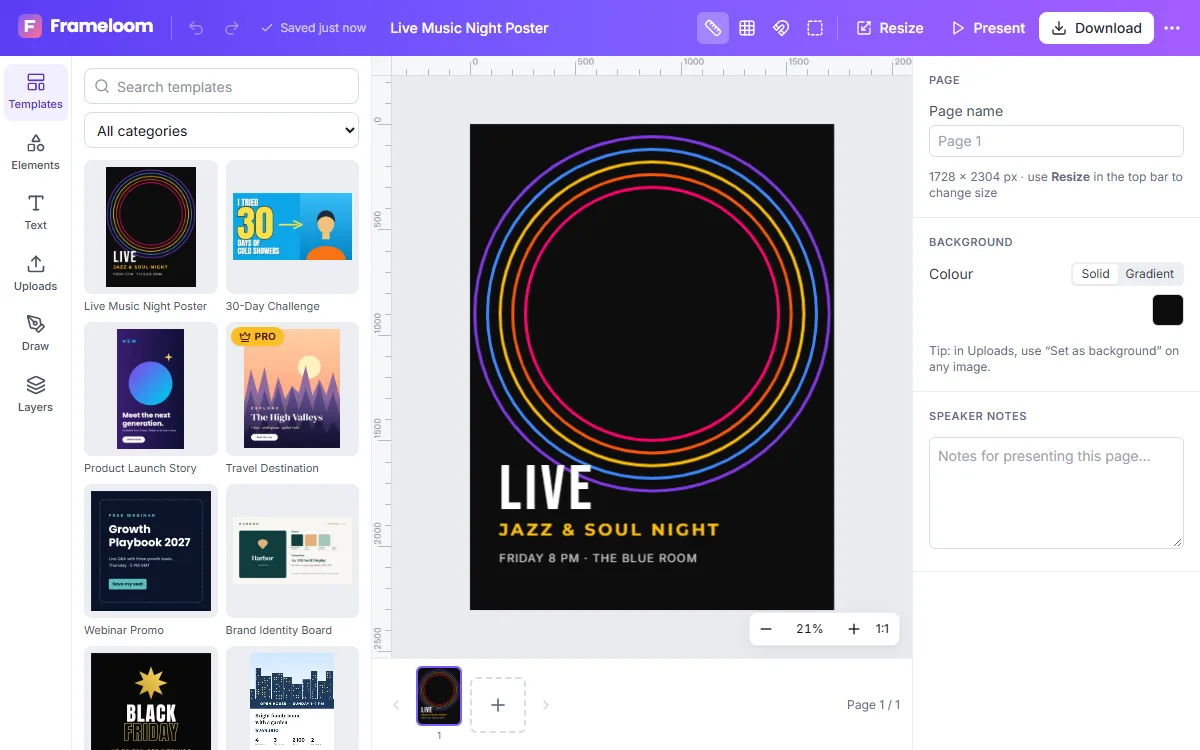
Features of the Poster Maker
Print-ready sizes
18×24 inch and A3 presets, or any custom size up to 20,000 pixels on a side.
Print-quality PDF
A 300 DPI PDF export renders every page at print resolution.
Expressive typography
Display fonts such as Bebas Neue, Anton and Abril Fatface with spacing and outline controls.
Photo backgrounds
Use your own photo full-bleed, adjust its exposure and apply a filter for a consistent look.
How to use the Poster Maker
- 1
Pick a poster size
Choose 18×24 in, A3 or a custom size, or start from a poster template.
- 2
Lay out the details
Add the event name, date, place and call to action, with the most important line largest.
- 3
Print or share
Download a print-quality PDF for a print shop or a PNG for social media.
A clear hierarchy wins
People look at a poster for only a few seconds. Make one element dominant — usually the event name — then give the date and place a clear second level. Group small details together at the bottom.
Printing tips
Ask your print shop whether they need bleed. If so, extend background colours and photos to the very edge of the page and keep text a little inside the margins.
Poster ideas
Posters are used for far more than concerts. Teachers make classroom posters, shops promote seasonal sales, clubs announce meetings and makers create art prints. Start from a template in the closest style and change the content — layouts with a strong headline adapt well to almost any topic.
Frequently asked questions
What resolution are printed posters?
The print PDF option renders at 300 DPI, the standard for most printers.
Can I make a custom poster size?
Yes. Enter any width and height in pixels when creating a design, or resize an existing design.
Is the PDF text selectable?
Not yet. PDF pages are high-resolution images, which print accurately but cannot be edited in a PDF editor.
Related tools
Flyer Maker
Make flyers for events, promotions and services with editable A4 templates. Swap photos, update details and export a print-ready PDF or shareable image.
Invitation Maker
Design invitations for weddings, birthdays, baby showers and parties. Personalise free 5×7 templates and print at home or share them digitally.
Free Graphic Design Tool
Create professional graphics with a free drag-and-drop design tool: templates, text styles, shapes, photos, multi-page designs and PNG, PDF or SVG export.
Online Photo Editor
Fix exposure, warm up colours and add film-style filters with an online photo editor. Every edit is non-destructive, so you can change it any time.
Try the Poster Maker now
It is free, it runs in your browser and you do not need an account to start.