
Graphic design
A free graphic design tool for everyone
ZeoCanvas is a drag-and-drop design studio for people who need good-looking graphics without learning professional software. Start from a blank canvas in one of 22 preset sizes or from more than 110 original templates.
Add headings, shapes, lines, stickers and your own photos, arrange them with smart alignment tools and export in the format you need.
Free · No signup required
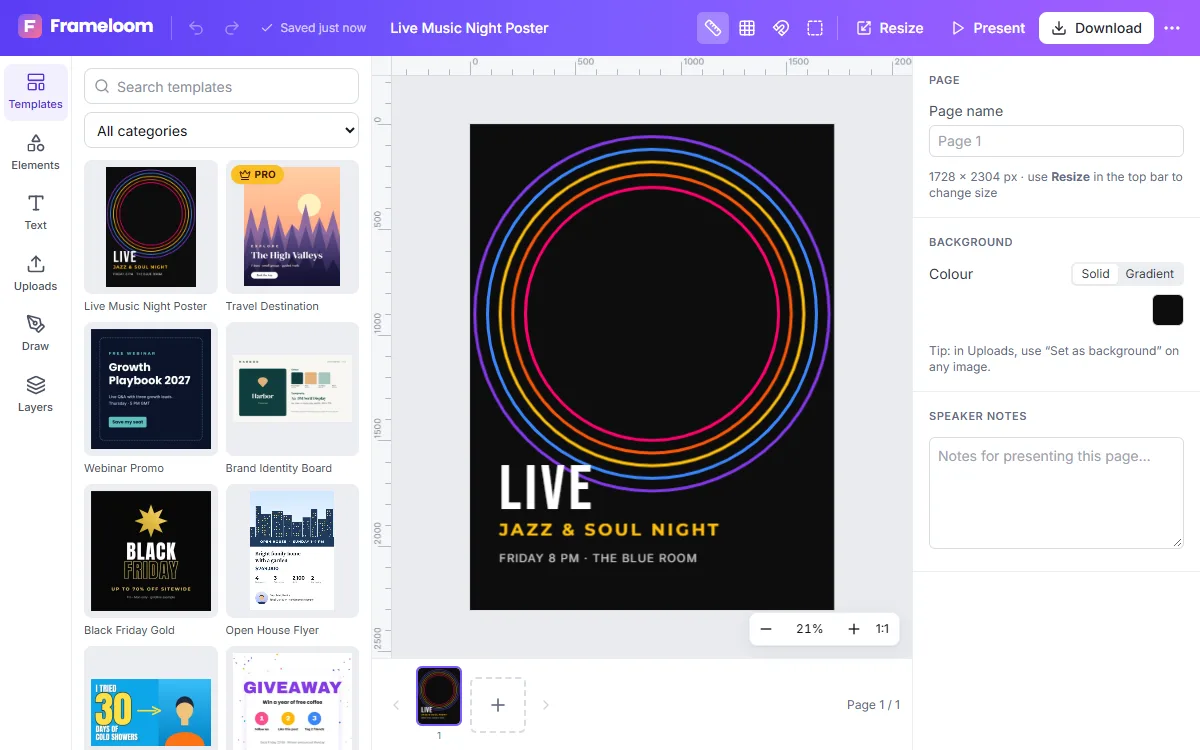
Features of the Free Graphic Design Tool
Text that looks designed
22 typefaces, weights, italics, letter spacing, line height, alignment, outlines and shadows.
Shapes and stickers
Rectangles, ellipses, triangles, polygons, stars, lines, arrows and a library of vector stickers — all recolourable.
Layers and alignment
Reorder layers, group and ungroup, lock elements, align to the page or to each other and distribute evenly.
Multi-page designs
Add, duplicate and reorder pages for carousels, brochures and decks, each with its own background.
Magic Resize
Turn a finished design into a new size — a post into a story, for example — and the layout adapts.
Autosave and versions
Changes save automatically, and earlier versions can be restored from the version history.
How to use the Free Graphic Design Tool
- 1
Pick a size or template
Choose a preset such as Instagram Post or A4 flyer, enter a custom size, or open a template.
- 2
Customise everything
Edit text in place, replace images, change colours and fonts, and move anything with the mouse or keyboard.
- 3
Download or keep editing
Export PNG, JPG, WebP, PDF or SVG. Your design stays in your projects for later.
Built for non-designers
Templates are built from editable layers, not flat pictures, so you can change any word, colour or photo. Snapping guides help line things up, and keyboard shortcuts such as T for text or R for rectangles make repetitive work quick.
Export options for every destination
Choose the scale (up to 4×) for sharp images on high-density screens, transparent backgrounds for PNG and WebP, and a 300 DPI option for print-ready PDFs. Multi-page designs download as a PDF or a ZIP of images.
- PNG for crisp graphics and transparency
- JPG for small photo-heavy files
- PDF for print and sharing
- SVG for vector workflows
Frequently asked questions
Do I need design experience?
No. Templates give you a professional starting point and every element can be changed with simple controls.
Can I use my own fonts?
Not yet. You can choose from 22 fonts that are built in, covering sans-serif, serif, display and handwriting styles.
Can I use the designs commercially?
Yes. The templates and graphics in ZeoCanvas are original and may be used in personal and commercial designs. See the terms for details.
Does it work offline?
Editing needs an internet connection to save. If the connection drops, your latest changes are kept on the device and saved when you reconnect.
Related tools
Social Media Design Maker
Create matching designs for Instagram, Facebook, LinkedIn and YouTube. Resize one design to every platform with Magic Resize and keep your look consistent.
Poster Maker
Design event, sale and announcement posters with free templates in 18×24 in and A3 sizes. Download a print-quality 300 DPI PDF or a PNG.
Flyer Maker
Make flyers for events, promotions and services with editable A4 templates. Swap photos, update details and export a print-ready PDF or shareable image.
Presentation Maker
Build slide decks with free 16:9 presentation templates, speaker notes and full-screen present mode. Export every slide to PDF or images.
Try the Free Graphic Design Tool now
It is free, it runs in your browser and you do not need an account to start.