
Image enhancer
AI image enhancer and upscaler
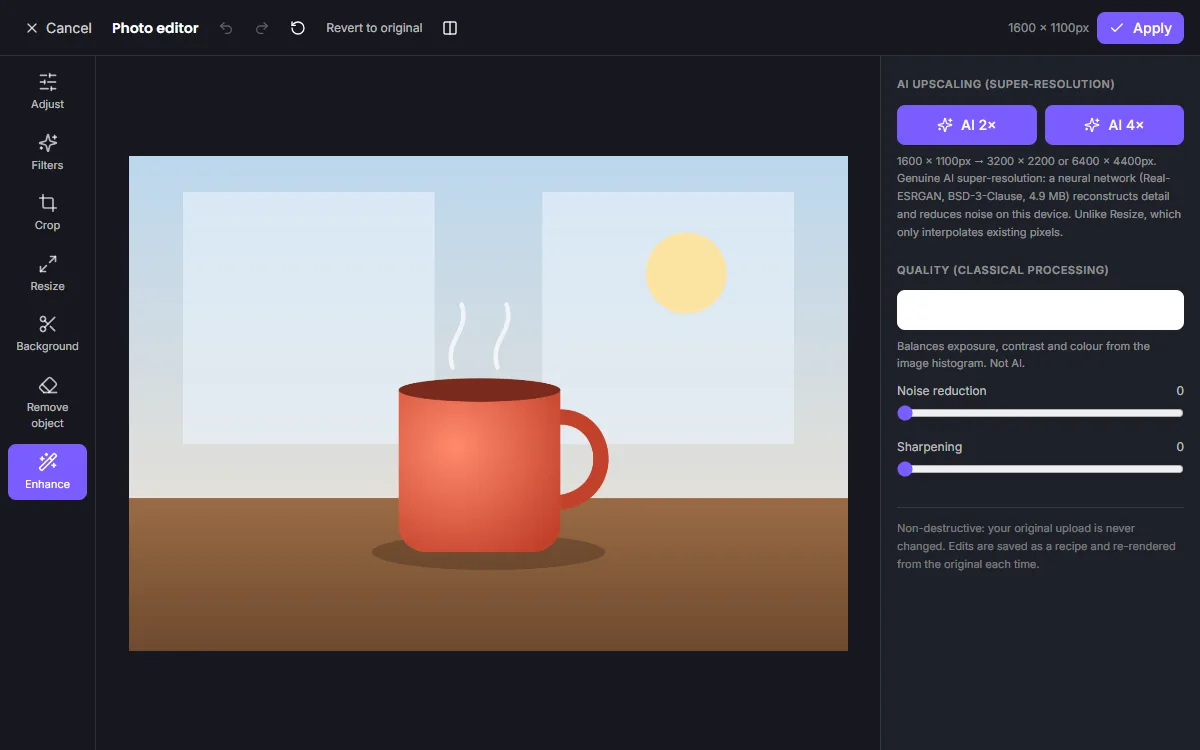
Make small or soft images usable again. ZeoCanvas’s enhancer upscales a picture 2× or 4× with a Real-ESRGAN super-resolution model, which reconstructs detail instead of simply stretching pixels.
Follow up with sharpening, noise reduction and colour adjustments to finish the image.
Free · No signup required
Features of the Image Enhancer
AI upscaling 2× and 4×
A super-resolution model adds plausible detail when enlarging, unlike ordinary resizing.
Denoise and sharpen
Reduce grain from low-light photos and bring back crispness after upscaling.
Light and colour fixes
Exposure, highlights, shadows, contrast and white balance in the same editor.
Runs on your device
The model runs in the browser — WebGPU where supported, otherwise the CPU.
How to use the Image Enhancer
- 1
Open your image
Upload the photo and choose the Enhance tool.
- 2
Upscale with AI
Pick AI 2× or 4×. Large images are processed in tiles to keep memory use in check.
- 3
Fine-tune and apply
Add sharpening or noise reduction, compare with the original and apply.
Upscaling versus resizing
Resizing makes an image bigger by interpolating between existing pixels, which looks soft. AI upscaling predicts the missing detail — edges, textures and lettering — based on what it has learned from many images, producing a sharper result at the larger size.
- Use AI upscaling for small images you need to print or show large
- Use plain resizing when you only need a smaller file
Know the limits
Super-resolution cannot recover information that is completely missing. Heavily compressed or blurred photos improve but will not look like they were taken with a better camera. Processing time depends on your device.
Frequently asked questions
How large can I upscale?
Up to 4×. Very large outputs are limited by your device’s memory, and the editor tells you if a size is too large.
Is the enhancer free?
Yes. It runs on your device, so there are no per-image charges.
Does it change faces?
The model enhances general detail; it is not a face-generation model and does not invent new facial features.
Related tools
Photo Background Remover
Remove photo backgrounds automatically with AI that runs on your own device. Get a transparent PNG or replace the background with a colour or image.
Online Photo Editor
Fix exposure, warm up colours and add film-style filters with an online photo editor. Every edit is non-destructive, so you can change it any time.
Free Online Image Editor
Crop, resize, adjust colours, apply filters and remove backgrounds with a free online image editor. Works in your browser, no signup or download.
Poster Maker
Design event, sale and announcement posters with free templates in 18×24 in and A3 sizes. Download a print-quality 300 DPI PDF or a PNG.
Try the Image Enhancer now
It is free, it runs in your browser and you do not need an account to start.